No-Code Web Scraper
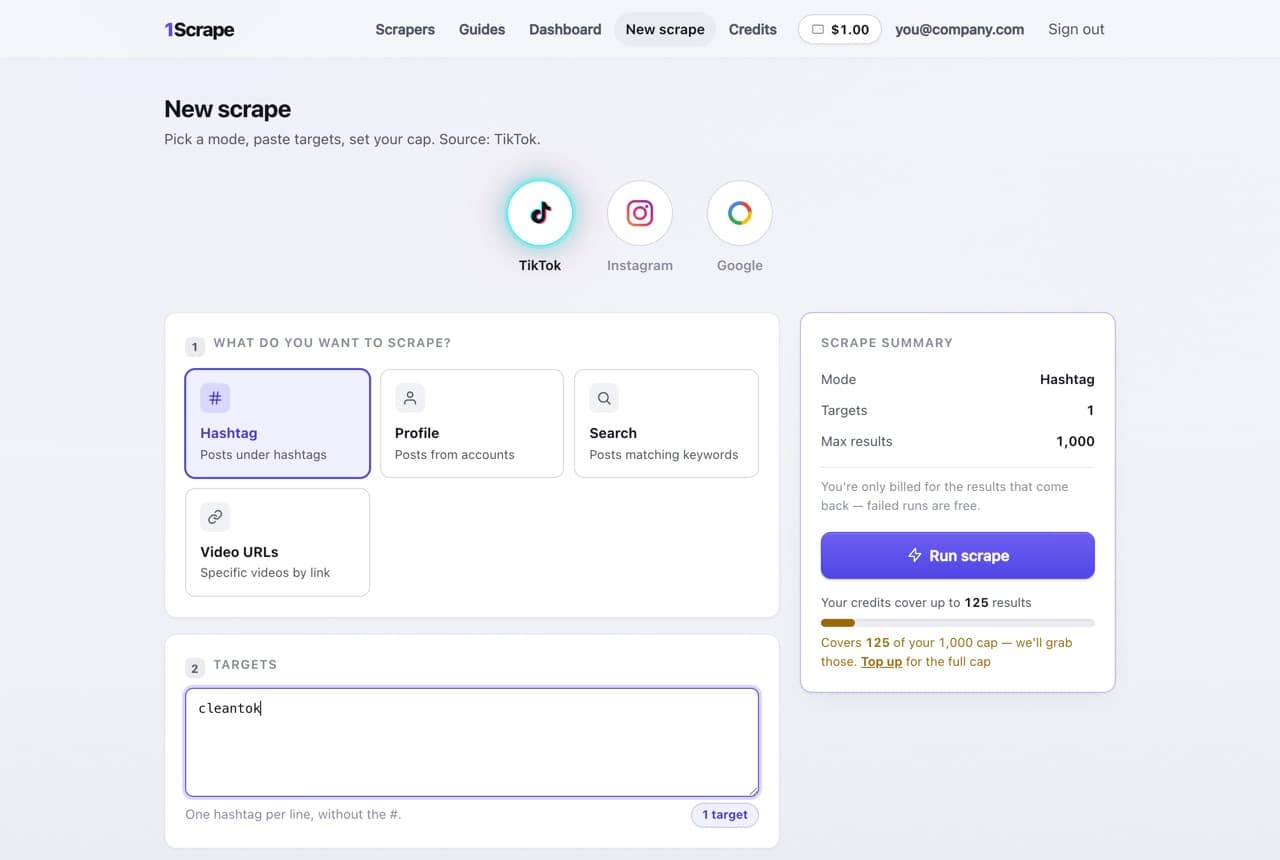
A no-code web scraper should mean you never think like a programmer — not that the code is hidden behind a diagram of it. Plenty of "no code" tools still hand you selectors, pagination rules, and workflows to debug. 1Scrape's version of no code is a form: pick a source, type what you want, set how many results, press start.
It covers the three sources where most lead and research data actually lives — TikTok, Instagram, and Google Maps — and returns the same clean, spreadsheet-ready CSV every time, with public emails and phone numbers in their own columns. Every new account starts with $5.00 in free credits, so your first scrapes cost nothing and there's no card to enter.
$5.00 free to start · no card required · failed runs are free
What lands in your CSV
One row per result, every field in its own column — no cleanup, no copy-paste. Here's the shape of the file you download:
| username | followers | likes | plays | video_url | |
|---|---|---|---|---|---|
| @cleantokpro | 48,200 | hi@cleantokpro.com | 12,400 | 310,000 | tiktok.com/@cleantokpro/video/73… |
| @thetidyhome | 12,050 | — | 3,180 | 84,600 | tiktok.com/@thetidyhome/video/72… |
| @spotlessdaily | 156,900 | book@spotless.co | 41,700 | 1,204,000 | tiktok.com/@spotlessdaily/video/74… |
What it looks like
What "no code" means here
Most no-code scrapers are visual programming: you point at page elements, teach the tool to paginate, and fix the workflow when the site's layout changes. You didn't write code, but you did the job of code.
1Scrape removes the workflow, not just the syntax. Because it's purpose-built for its three sources, there's nothing to teach it — it already knows what a TikTok post, an Instagram profile, and a Google Maps listing look like. Your entire job is describing what you want, the way you'd type it into a search box.
What you can scrape without writing code
TikTok
Hashtags, keyword searches, profiles, and video URLs — posts with views, likes, captions, and the creator's public bio email and phone.
Profiles, hashtags, and niches — follower counts, bios, and the public contact email or link a creator publishes.
Google Maps
Any "what in where" business search — name, phone, address, website, rating, and reviews, with optional email enrichment from each business's own site.
Contact columns by default
Email, phone, and bio-link columns come with every social export, so a scrape doubles as a lead list without any extra step.
The honest limits
1Scrape is not a general-purpose scraper, and pretending otherwise would waste your afternoon. It cannot scrape arbitrary websites — no e-commerce catalogs, no forums, no paste-any-URL crawling. If that's the job, a workflow-builder tool like Octoparse is genuinely the right category, selectors and all.
The trade runs the other way too: if your target is TikTok, Instagram, or Google Maps, a general-purpose tool makes you build something 1Scrape already is. Zero setup only exists because the scope is narrow on purpose.
How to judge any no-code scraper
Whichever tool you land on — including the ones we compare ourselves to — the same four questions sort the field:
- Time to first row: minutes from signup to real data, or an afternoon of tutorial videos first?
- Pricing you can predict: a published per-result rate beats subscription tiers you have to size in advance.
- Output you can use: a clean CSV with consistent columns, not a JSON blob or an in-app table you export by hand.
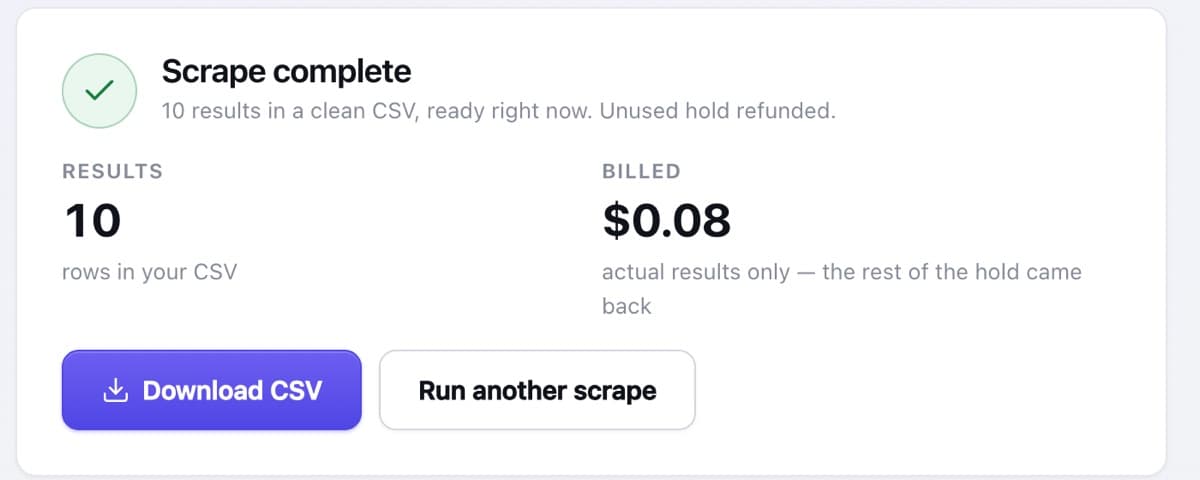
- Spend control: what happens when a run fails or under-delivers? Here, failed runs are free and the unused hold is refunded — ask any tool the same question.
How it works
Pick a source
TikTok, Instagram, or Google Maps — the form adapts to what you pick.
Type your target
A hashtag, a niche, a list of profiles, or a "plumbers in Tampa" search. No selectors, no workflow.
Set a cap and run
Choose how many results you want. Starting the run holds only its worst-case cost against your prepaid balance.
Download the CSV
Billed per result scraped — never your full cap — with the unused hold refunded the moment it finishes.
Frequently asked questions
Do I need to know how to code?
No. You fill in a short form — what to scrape and how many results you want — watch the count climb live, and download the CSV when it finishes. There's nothing to install and no API to wire up.
Can a no-code scraper handle any website?
Not this one — 1Scrape covers TikTok, Instagram, and Google Maps only. That narrow scope is exactly why it needs no setup: it already understands its three sources, so there's nothing for you to configure. For scraping arbitrary websites, a general-purpose workflow tool is the right pick.
What's the best no-code web scraper?
It depends on the target. For arbitrary websites, a workflow builder like Octoparse earns its complexity. For TikTok, Instagram, or Google Maps — where most lead-gen and creator research actually happens — a purpose-built tool wins on time-to-data: type a target, run, download. The $5.00 free credits let you test that claim on your own job before believing it.
Is web scraping without coding reliable?
More reliable than the DIY route, in one specific way: when a platform changes its layout, fixing the scraper is our job, not yours. There are no selectors of yours to break. And if a run does fail, it's refunded in full automatically.
How much does it cost?
Runs are priced at $8 per 1,000 results, and every new account starts with $5.00 in free credits — enough to pull thousands of rows before you pay anything. You're billed per result scraped — never for your full cap — and the unused hold is refunded the moment a run finishes. If you use a lead filter like "only profiles with an email", the CSV keeps just the matches while you still pay per profile scraped. If a run fails, it's refunded in full and never costs a credit.
What format do I get the data in?
A clean, spreadsheet-ready CSV that opens in Excel, Google Sheets, or Numbers, and imports straight into a database or your own scripts. Every row is one post with its own columns — no copy-paste, no reformatting.
Is this legal?
We only collect data that's already public — the same posts, captions, counts, and the contact info creators choose to put in their public bio. We don't touch private accounts or log-in-gated content, and we never try to reach anything a creator has kept private. You're responsible for using the data in line with TikTok's terms and any privacy laws that apply to you, so scrape public data, respect people's rights, and don't spam.